Since Oracle 9.2 the shared pool can be “partitioned” into multiple parts. This was probably done for relieving shared pool latch contention for crappy applications (which use shared pool latches too much due bad cursor or connection management).
The “partitions” are called shared pool subpools and there can be up to 7 subpools. Each subpool is protected by a separate shared pool latch and each subpool has its own freelists and LRU list. If you are interested in more details, a good starting point is this whitepaper by Oracle.
There are few different ways for detecting how many subpools you have in use. The more convenient ones are here:
You could query X$KGHLU which has a line for each shared pool subpool and (from 10g) also java pool if it’s defined:
SQL> select count(distinct kghluidx) num_subpools
  2  from x$kghlu
  3  where kghlushrpool = 1;

NUM_SUBPOOLS
------------
           7
The “kghlushrpool” column, which is 1 for shared pool subheaps and 0 for java pool, isn’t there in 9i (and in 9i the java pool apparently is not reported in x$kghlu anyway).
The reason why I don’t just count all matching lines from x$kghlu but use count distinct instead is that in Oracle 10.2.0.1 there are 4x more lines reported in this x$table. There’s an additional concept called sub-sub-pool starting from 10.2 where each shared pool sub-pool is split futher into 4 areas (allocations with different expected lifetime/durations go into different sub-sub-pools, but the same sub-pool latch protects all activity in sub-sub pools too). But in 10.2.0.1 the x$kghlu reports all sub-sub-pools too for some reason. The whitepaper from Oracle mentioned above explains this in more detail.
So from above output I see that in my instance all 7 shared pool subpools are in use. Oracle determines the number of needed subpools (during instance startup) based on your shared pool size and cpu_count. IIRC in 9.2 if you had 4 CPUs or more AND the shared_pool_size was bigger than 256 MB then 2 subpools were used, in 10g shared_pool_size had to be bigger for that, 512 MB I think and in 11g its 1GB. I don’t recall the exact threshold values and that’s not really important as you can see yourself how many subpools are in use with the above query.
For sake of this experiment I set the _kghdsidx_count variable to 7, this parameter can be used to force the number of subpools you want. In 9.2 days it was actually quite common to set this back to 1 IF you had ORA-4031 errors AND the reason was diagnosed to be free space imbalance between subpools. However since 10g this has been almost unnecessary as Oracle has improved their heap management algorithms.
SQL> @pd kghdsidx

NAME                                          VALUE                          DESCRIPTION
--------------------------------------------- ------------------------------ ------------------
_kghdsidx_count                               7                              max kghdsidx count
The script above queries few X$ tables to show the value of this hidden parameter.
So far the two above approaches have required access to X$ tables which usually means you need to be logged on as SYSDBA. What if you don’t have such access?
In such case you can work this out pretty reliably by looking into how many of the shared pool latches are actually in use. All 7 latches are always there, even if you have less subpools in use, that number is hardcoded into Oracle. But you can see how many latches have a significant number of gets against them.
In my case its evident that all latches are in use, they all have significant number of gets against them:
SQL> select child#, gets
  2  from v$latch_children
  3  where name = 'shared pool'
  4  order by child#;

    CHILD#       GETS
---------- ----------
         1     765883
         2    3560835
         3     101684
         4      98391
         5      86481
         6    6130039
         7      82593

7 rows selected.
It’s ok to see some latch gets against the latches of unused subheaps, but this number should be much much smaller than others. The reason appears to be that all subheap latches are taken when shared pool is allocated and when shared pool resize operations are done.
For example, this is what I see after setting the number of shared pool subpools to 2 in my test database (and running some hard parsing workload):
SQL> select child#, gets
  2  from v$latch_children
  3  where name = 'shared pool'
  4  order by child#;

    CHILD#       GETS
---------- ----------
         1   27538623
         2   17924565
         3        131
         4        131
         5        131
         6        131
         7        131

7 rows selected.
And now to the troubleshooting part!
Note that this article doesn’t aim to explain all the basics of ORA-4031 troubleshooting, I’ll talk about the subpool utilization imbalance problem only. If you haven’t read metalink note 396940.1 – “Troubleshooting and Diagnosing ORA-4031 Error” yet, I recommend to do this first and then read my comments here.
As you know, ORA-4031 errors look like this:
ORA-04031: "unable to allocate n bytes of shared memory ("shared pool", "object_name", "alloc type(2,0)" ...)
“n” shows how many bytes we tried to allocate when ended up with the failure. Italic strings can show various different values but essentially they’re just some metadata describing for what did we try to allocate that memory.
Note the two bold pieces. The “shared pool” means that we tried to make the allocation from shared pool (if you have problems with other pools you can see there “large pool”, “streams pool”, “java pool” as well).
The “2” in “(2,0)” means that the failure happened in shared pool sub pool number 2 and the “0” shows sub-sub-pool number 0.
Sometimes the error happens just due heavily undersized shared pool (combined bad cursor management or some incorrect parameter values). In such cases you would see the shared pool free memory drop to near-zero in V$SGASTAT.
However, sometimes you can have ORA-4031’s even when you see plenty of free space available in V$SGASTAT. What’s the issue with that?
This case happens mainly for two reasons:
**1) Shared pool free memory fragmentation
** There is no big enough free chunk available even after flushing out unpinned chunks from LRU list. In other words, you have a lot of small free chunks scattered around in different places in shared pool but there is no single big enough chunk available for acommodating our allocation. I will talk about troubleshooting this problem in a separate post.
**2) Unbalanced memory usage / free memory in different shared pool subpools
** This is what I’m explaining in current post.
So, how to monitor which subpool has how much free memory available?
V$SGASTAT unfortunately just shows a sum of all subpools:
SQL> select * from v$sgastat
  2  where pool = 'shared pool'
  3  and name = 'free memory';

POOL         NAME                            BYTES
------------ -------------------------- ----------
shared pool  free memory                 188017360
However when we look into the source code of GV$SGASTAT we see this (output edited for readability):
SQL> @v gv$sgastat

VIEW_NAME  TEXT
---------- --------------------------------------------------------------------------------
GV$SGASTAT select inst_id,'',ksmssnam,ksmsslen from x$ksmfs where ksmsslen>1  union all

           select inst_id,'shared pool',ksmssnam, sum(ksmsslen)
           from x$ksmss
           where ksmsslen>1
           group by inst_id, 'shared pool', ksmssnam

           union all  select
           inst_id,'large pool',ksmssnam, sum(ksmsslen) from x$ksmls    where ksmsslen>1
           group by inst_id, 'large pool', ksmssnam  union all  select inst_id,'java
           pool',ksmssnam, sum(ksmsslen) from x$ksmjs    where ksmsslen>1 group by inst_id,
           'java pool', ksmssnam  union all  select inst_id,'streams pool',ksmssnam,
           sum(ksmsslen) from x$ksmstrs    where ksmsslen>1 group by inst_id, 'streams
           pool', ksmssnam
V$SGASTAT gets its shared pool stats from x$ksmss. Lets describe it:
SQL> desc x$ksmss
           Name                            Null?    Type
           ------------------------------- -------- ------------
    1      ADDR                                     RAW(8)
    2      INDX                                     NUMBER
    3      INST_ID                                  NUMBER
    4      KSMSSLEN                                 NUMBER
    5      KSMSSNAM                                 VARCHAR2(26)
    6      KSMDSIDX                                 NUMBER
There’s an interesting column, KSMDSIDX column – and it’s also what I was looking for! This column contains the subpool number in it!
Before I query by that column, remember, I had set the number of subpools back to 2 in my test instance:
SQL> @pd kghdsidx

NAME                                          VALUE                          DESCRIPTION
--------------------------------------------- ------------------------------ -------------------
_kghdsidx_count                               2                              max kghdsidx count
Ok, lets see what values we have in that column:
SQL> select distinct ksmdsidx from x$ksmss;

  KSMDSIDX
----------
         1
         2
         0
Hmm… 1 and 2 look ok as I have subpool 1 and 2 defined in the instance, but why is there a subpool 0 also reported? (from 10g anyway).
This is due a little feature in Oracle. When you start the instance in 10g, then not all memory reserved for shared pool is immediately given to subpool heaps. Some memory is reserved for individual subpool growth. This allows some subpools to grab more memory than others if they have more allocations after instance startup. This may be useful in cases where due some specific issue some subpool always needs much more memory than others. On the other hand, I have not seen a subpool heap give memory back to some other subpool so if one subpool allocates all of the reserved memory after instance start due some application startup activity, then the other pools may remain too small for the whole lifetime of the instance.
So, if you have ORA-4031 out of shared pool memory errors or suspect that shared pool memory pressure is the cause of some performance problem (like shared pool latch contention and excessive library cache evictions/reloads) then you’d want to monitor shared pool memory breakdown at the subheap level.
And (finally) I can introduce a little script sgastatx.sql which queries X$KSMSS and formats the output for better readability.
The script takes one parameter, what memory allocation reasons to report (% would report all):
I will start with “total” which just reports me the shared pool totals and doesn’t break down by allocation reason.
SQL> @sgastatx total

-- All allocations:

SUBPOOL                             BYTES         MB
------------------------------ ---------- ----------
shared pool (0 - Unused):       192937984        184
shared pool (1):                 62919000         60
shared pool (2):                 67109232         64
shared pool (Total):            322966216        308

-- Allocations matching "total":

no rows selected
The bold part above is the total memory reserved for shared pool. The “0 – unused” is the not-yet-used-for-any-subheap part of the memory. And 1 & 2 are the allocations to subheap 1 and 2.
By the way I can confirm these numbers by querying v$sgainfo:
SQL> select * from v$sgainfo;

NAME                                  BYTES RES
-------------------------------- ---------- ---
Fixed SGA Size                      2075656 No
Redo Buffers                        6311936 No
Buffer Cache Size                 184549376 Yes
Shared Pool Size                  322961408 Yes
Large Pool Size                     4194304 Yes
Java Pool Size                      4194304 Yes
Streams Pool Size                         0 Yes
Granule Size                        4194304 No
Maximum SGA Size                  734003200 No
Startup overhead in Shared Pool    88080384 No
Free SGA Memory Available         209715200

11 rows selected.
….or V$SGA_DYNAMIC_COMPONENTS:
SQL> select current_size from v$sga_dynamic_components where component = 'shared pool';

CURRENT_SIZE
------------
   322961408
Continuing with the examples, usually I would be interested in seeing how much free memory each subpool has in it:
SQL> @sgastatx "free memory"

-- All allocations:

SUBPOOL                             BYTES         MB
------------------------------ ---------- ----------
shared pool (0 - Unused):       180355072        172
shared pool (1):                 67113304         64
shared pool (2):                 75497840         72
shared pool (Total):            322966216        308

-- Allocations matching "free memory":

SUBPOOL                        NAME                       SUM(BYTES)         MB
------------------------------ -------------------------- ---------- ----------
shared pool (0 - Unused):      free memory                 180355072        172

shared pool (1):               free memory                  12689424       12.1  <-- 12 MB of 64 allocated to this subheap is free

shared pool (2):               free memory                  14822176      14.14
And when there’s not enough free memory in some subpool then you can run sgastatx with % parameter to report all memory users in that subpool. I removed some lines from output for brevity:
SQL> @sgastatx %

-- All allocations:

SUBPOOL                             BYTES         MB
------------------------------ ---------- ----------
shared pool (0 - Unused):       171966464        164
shared pool (1):                 71307608         68
shared pool (2):                 79692144         76
shared pool (Total):            322966216        308

-- Allocations matching "%":

SUBPOOL                        NAME                       SUM(BYTES)         MB
------------------------------ -------------------------- ---------- ----------
shared pool (0 - Unused):      free memory                 171966464        164

shared pool (1):               free memory                  12045488      11.49
                               ASH buffers                   6291456          6
                               sql area                      6133120       5.85
                               private strands               4359168       4.16
                               library cache                 4122344       3.93
                               KSFD SGA I/O b                3977088       3.79
                               event statistics per sess     2764800       2.64
                               KTI-UNDO                      2323992       2.22
                               KGLS heap                     2154696       2.05
                               kglsim hash table bkts        2097152          2
                               PL/SQL MPCODE                 1884456        1.8
                               sessions                      1588808       1.52

[...snip...]

shared pool (2):               free memory                  14726904      14.04
                               row cache                     7495336       7.15
                               ASH buffers                   6029312       5.75
                               sql area                      4405040        4.2
                               private strands               4359168       4.16
                               KCB Table Scan Buffer         3981120        3.8
                               FileOpenBlock                 3977984       3.79
                               event statistics per sess     2764800       2.64
                               KTI-UNDO                      2323992       2.22
                               kglsim hash table bkts        2097152          2
                               library cache                 2059376       1.96
                               KQR M PO                      1603584       1.53
                               sessions                      1593600       1.52
                               VIRTUAL CIRCUITS              1401600       1.34
                               KGLS heap                     1377192       1.31
                               PL/SQL MPCODE                 1163344       1.11
                               CCursor                       1134520       1.08
                               dbwriter coalesce buffer      1052672          1
                               KSXR receive buffers          1036000        .99

[...snip...]

731 rows selected.
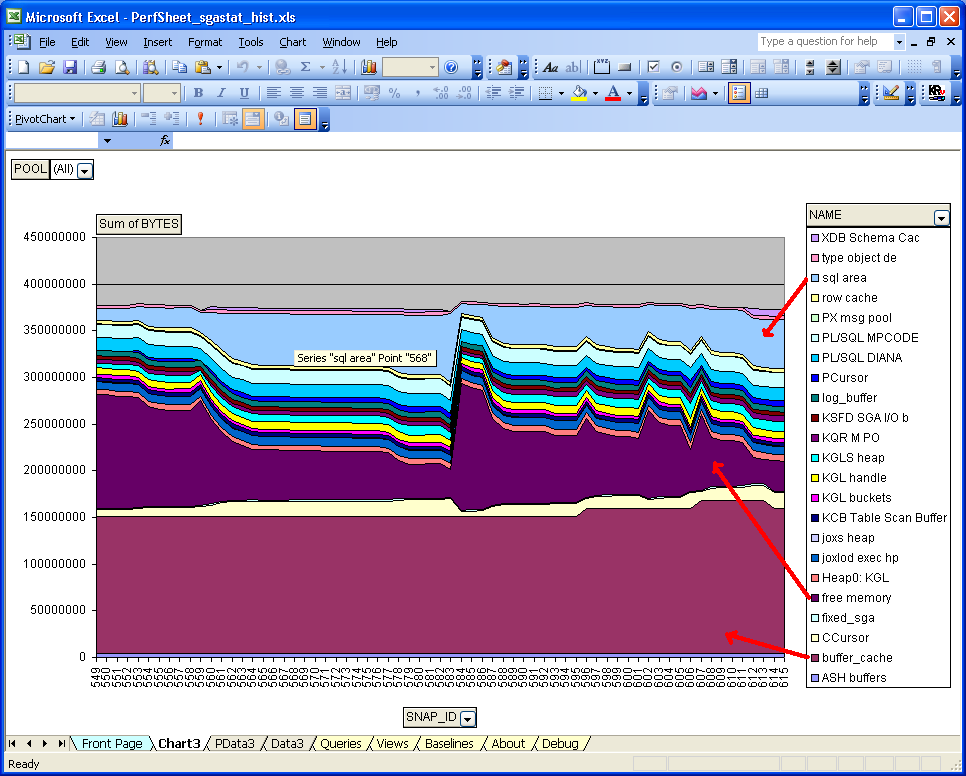
Of course sometimes you’d want to know how the memory usage breakdown changes over time, for that you’d need to write a little collector script which dumps the data into some table and visualize it later on, like I have done for regular V$SGASTAT data with my PerfSheet tool ;-)
Happy monitoring :)